



Workflow validation
Five dependency rules a transition can enforce on a Work Item Selector field, and what the cycle check does when the graph is too large.
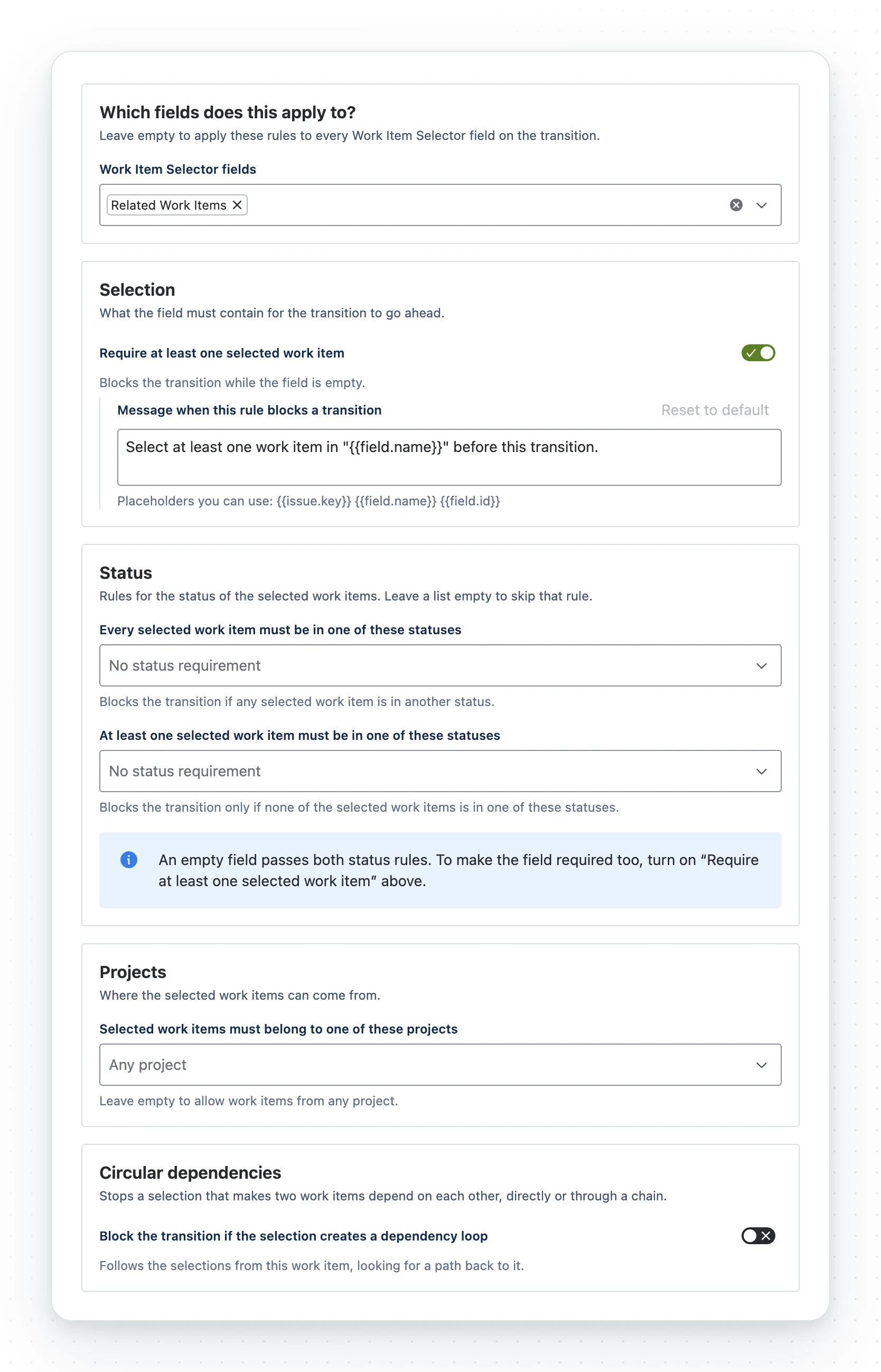
The Work Item Selector dependency validator blocks a transition until the selection meets your rules. It is set on the workflow, so one field can be optional on one transition and required on another. In Estonian it is Work Item Selectori sõltuvuste valideerija.
The five rules
| Setting | Blocks the transition when |
|---|---|
| Require at least one selected work item | The field is empty |
| Every selected work item must be in one of these statuses | Any selected work item is in another status |
| At least one selected work item must be in one of these statuses | None of the selected work items is in one of them |
| Selected work items must belong to one of these projects | A selected work item belongs to another project |
| Block the transition if the selection creates a dependency loop | The selection leads back to this work item, directly or through a chain |
- No fields chosen: the rules apply to every Work Item Selector field.
- An empty status or project list skips that rule.
- Statuses match by name, so Done means Done in every space, new ones included.
- Changes on the transition screen count: the validator checks the value about to be saved.
With nothing selected there is nothing to break them. To make the field mandatory as well, turn on Require at least one selected work item.
The message a person sees
Each rule has a default message you can replace. Reset to default restores it.
Select at least one work item in "{{field.name}}" before this transition.Every work item in "{{field.name}}" must be in one of the required statuses. {{workItem.key}} is not.At least one work item in "{{field.name}}" must be in one of the required statuses.Work items in "{{field.name}}" must belong to an allowed project. {{workItem.key}} does not.This selection creates a circular dependency back to {{issue.key}}.The defaults are always in English. Your own message is shown as written.
| Placeholder | Rules |
|---|---|
{{issue.key}}, {{field.name}}, {{field.id}} |
All |
{{workItem.key}}, {{workItem.summary}}, {{workItem.status}}, {{workItem.project}} |
Every work item in a status; projects |
{{workItems.keys}}, {{workItems.count}} |
All except at least one selected |
{{requiredStatuses}} |
Both status rules |
The screen lists each rule’s placeholders under its message box.
Transitions are checked with the app’s permissions, so {{workItem.summary}} shows the
summary even to someone who cannot open that work item. Use {{workItem.key}} where that
matters.
- Unknown placeholders are dropped.
- Messages are cut at 500 characters.
- A message that comes out empty shows the default instead.
What the cycle check does at scale
The check runs during the transition, so it is bounded. Maximum work items to check is 10 to 200 (default 60), and it stops after five levels. Past that, the transition is allowed and a warning is logged. If you need hard cycle prevention on a very large graph, this is not the control.
The configuration screen
The screen lists the fields, statuses and spaces you can see. If one list fails to load, the other rules stay editable.
Only the new workflow editor can configure the validator. The old one can add it but not set it up.
Related
- Automation and JQL, which writes and reads the same selections
- Set up the field
- JQL scope
A problem or a question? Write to support@oktul.com or open a request in the Help Center (opens in a new tab).