



Fields and forms
Both are built on console scripts: a field or a form rule names a script, and nobody writes code in a field’s configuration. Both are in Jira only.
Scripted fields
Every scripted field takes its value from a console script, in one of two ways.
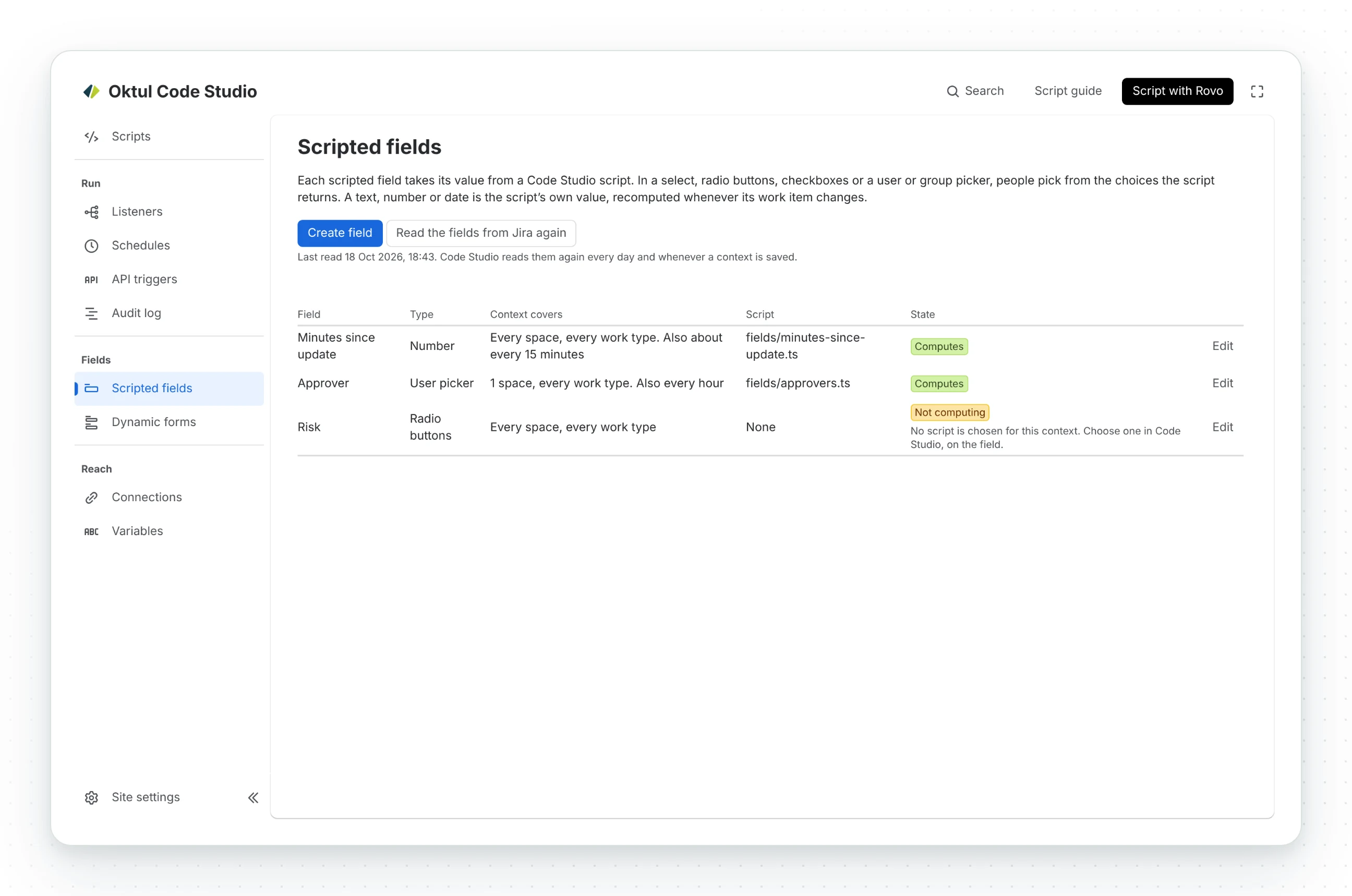
- Picked: Select, Multi select, Radio buttons, Checkboxes, User picker (one or several users) and Group picker (one or several groups). A person picks the value on the create screen, the work item and the portal, from the choices the script offers, in the same controls Jira uses for its own fields. The script also gives a default, written only to a work item whose field is empty, so a value a person chose is never replaced.
- Computed: Text, Paragraph, Number, Date, Date and time, URL, Labels and Cascading select. The value is the script’s alone. The field shows on the create screen, a transition and the portal’s request form, disabled, with the value its script gives for the form as it is filled in: when Assignee is chosen, a field reading the assignee’s email shows it. That value is a preview, run in the person’s browser with Jira read as them; the value stored is computed once the work item exists. Jira refuses a value typed or sent to the field from anywhere else. Do not make a computed field required on a create screen: nobody can fill it there.
Types Code Studio offered earlier stay, so fields made with them keep working: they are named “computed” or “with a default” in Jira’s list, and Create field no longer offers them.
Choices from the script
A picked field offers what the script’s options(context) export returns. Code Studio
reads it when the script is published, and again with Read the choices again in the field’s
Edit form.
| Field | options() returns |
With no options() |
|---|---|---|
| Select, multi select, radio buttons, checkboxes | A list of texts, up to 1,000 | The choices typed on the field |
| User picker | Account ids, each alone or as { value, label }, up to 200 |
Anyone on the site |
| Group picker | Group ids, each alone or as { value, label }, up to 200 |
No group; UI Kit has no group picker |
A person sees each person or group by name: the label the script gave, or the name Jira holds,
read by Code Studio when it stores the choices.
Jira refuses a value outside the offered people on every write, from every surface. For groups, Jira’s validation expressions describe no group value, so the editor and Code Studio’s own check hold the offered groups, and a REST call can still write any group.
A user picker offering the members of the approvers group, with the reporter as the default:
export async function options() {    const page = await jira.get('/rest/api/3/group/member', { query: { groupname: 'approvers', maxResults: 50 } });    return page.values.map((member) => ({ value: member.accountId, label: member.displayName }));}
export default async function (workItem) {    return workItem.fields?.reporter?.accountId ?? null;}
Keeping a value current
The value is stored on the work item, never computed on view. When a work item covered by a field’s context is created or changes, Code Studio runs the field’s script in production and writes the value, so JQL, exports and Automation read the current value and a view costs nothing. A backfill is one run over the context’s work items.
A value that moves with time, such as the minutes since the last update, or choices read from something else, such as a group’s members, would go stale between those events. Set Recompute on the field’s context:
| Recompute | What runs |
|---|---|
| When the work item changes | Only the work item’s own events. The default |
| Also about every 15 minutes | One run over the context’s work items each time Code Studio’s clock ticks, every 12 minutes |
| Also every hour, every day | The same, hourly or daily |
On a picked field a refresh reads options() again and changes no value: a choice
someone made stays. Each refresh of a computed field is one run over every work item the context
covers, so choose the longest interval that is
accurate enough.
Creating and editing a field
In the console, Fields, then Scripted fields.
- Create field asks who sets the value, the type, the script, how often to recompute, and whether changes go into the work item history.
- Edit opens the same form. Everything can change except the type, which Jira fixes once the field holds values.
- Run now recomputes every work item of the context, or reads the choices again.
- Delete field moves the field to Jira’s trash, restorable by a Jira administrator for 60 days.
- Who: a Code Studio administrator who also administers Jira. Only a published script runs.
Dynamic forms
A dynamic form rule changes a Jira form as it is filled in.
-
What it can do: hide or show a field, make it required or read-only, rename or describe it, set its value, limit its options.
-
What it can depend on: other fields, the space, the work type, or anything the person may read in Jira.
-
A rule names a script and a scope: spaces, work types and forms (create, the work item view, transition, and the customer portal’s request forms).
-
The script runs in the person’s browser, in Jira’s form frame, so it costs no Forge time per form or keystroke. It gets the form and
jira.get, a read of Jira as the person. It cannot write, fetch another host or use a connection. -
Code Studio applies a value only where nobody loses work: never as the work item view opens, because there setting a value saves it, and never over a value the person typed. Summary stays required.
-
In a service space, a rule on an agent form runs with or without a request type chosen: Code Studio registers it once per request type, since Jira matches an agent form with none only to work items with none.
What a rule can read and change
The script’s default export is called as (form, context) when the form opens and when a field the
script names changes.
| Name | What it does |
|---|---|
form.trigger |
"init" as the form opens, "change" when a field changes |
form.view |
The open form: GIC (create), IssueView, IssueTransition, their AgentView forms in a service space, JSMRequestCreate on the portal |
form.changed |
The field whose change started the run, or null as the form opens |
form.fields |
Every field the form holds |
form.field(idOrName) |
One field by id (customfield_10050, priority) or name. A field the form does not hold has present: false and ignores every change |
form.has(idOrName) |
Whether the form holds the field |
field.id, name, type, value |
What the field is and holds, in Jira’s shape for its type |
field.visible, required, readOnly, description |
How the form shows it now |
setVisible(true | false), setHidden(true | false) |
Show or hide the field. A hidden field is still saved |
setRequired(true | false) |
The form waits until the field is filled. Not on the work item view; Summary stays required |
setReadOnly(true | false) |
Show the field and stop the person changing it on this form |
setName(text) |
The label, on this form only |
setDescription(text) |
The help under the field, on this form only |
setValue(value), clear() |
Fill or empty the field. As the form opens, only an empty field or one still holding the rule’s value; on the work item view only when a field changes, because there a value is saved at once |
setOptionsVisibility(ids, true | false) |
For a select, radio buttons, checkboxes or a multi select: show only the listed option ids, or hide them, up to 100 |
context.projectId, issueTypeId, issueId, accountId |
The space, work type, work item (null on create) and the person |
context.portalId, requestTypeId |
The portal and request type, where one is chosen |
jira.get(path, { query }) |
Read Jira as the person, under /rest/api/3/, /rest/agile/1.0/ or /rest/servicedeskapi/ |
Resolution notes required on a transition and optional elsewhere:
export default async function (form, context) { const onTransition = context.view === 'IssueTransition' || context.view === 'IssueTransitionAgentView'; form.field('Resolution notes').setVisible(true).setRequired(onTransition);}The console’s Snippets has more worked examples:
- Scripted fields: a count, a select from other fields, choices from Jira, people and groups.
- Dynamic forms: required on a transition, read only by group, defaults, following a field, limiting choices, renaming, reading Jira, one request type.
Hiding a field is not a control
A hidden field is still saved by Jira. Use Jira’s own field configuration and permissions where a value must not be set.
Jira gives a form rule no handle on a Forge field or an Assets field, so a rule cannot change Code Studio’s own scripted fields or an Assets field (Atlassian’s FRGE-1220 and FRGE-2079).
Related
A problem or a question? Write to support@oktul.com or open a request in the Help Center (opens in a new tab). Both open a request with a reference and an SLA.