



Script languages, publishing and Git
A script is a JavaScript or TypeScript file in a space, edited in the console. Its default export is what runs.
export default async function (event, context: ScriptContext) { const item = await jira.get(`/rest/api/3/issue/${event.issue.key}`, { query: { fields: 'summary' } }); log.info(`Summary: ${item.fields.summary}`); return { key: event.issue.key };}The first argument, event, is what started the run: a listener’s event, an automation rule’s
smart values, an HTTP request, or the test event typed in the console. The second, context,
carries the run’s mode, its id and the script variables.
- Writing scripts: what each trigger hands a script, and how to read and write so the sandbox predicts production.
- Script API reference: every declaration.
- Requests to other systems: calls to other APIs.
- Script examples: whole scripts to adapt.
- Snippets: the console’s short examples, one page per kind.
Languages
| Language | How it runs |
|---|---|
| JavaScript | In QuickJS compiled to WebAssembly, one fresh runtime per run |
| TypeScript | Its types are stripped, then it runs as JavaScript |
| AssemblyScript | Compiled to WebAssembly in your browser when it is saved, and imported by a script for heavy computation. It cannot make a request, read storage or see a secret |
| Groovy | Not run. Imported for conversion only: see Groovy migration |
- Imports: another script or an AssemblyScript module, by relative path.
- ScriptRunner Connect scripts run unchanged. Code Studio serves
./api/jira/cloud,./api/jsm/cloud/assetsand./api/<key>when the space has no file at that path. - Completion covers the Code Studio API, these modules and your site’s variable names.
The script API
| Global | What it does |
|---|---|
jira, confluence, assets |
get, post, put, patch, delete and request on the product’s own REST paths, as the run’s principal. A status of 400 or more throws HttpError; request never throws |
http |
The same verbs on another system, through a connection by its key. The connection adds its credential |
connections.list() |
The connection keys this site has |
store |
JSON values kept between runs: get, set with an optional time to live, delete, list |
log |
debug, info, warn, error, written to the run’s own log. Secret variable values are blanked out |
context.environment.vars |
Script variables by name |
context.mode |
sandbox or production |
context.checkpoint(state) |
Marks where a continuation may resume; context.resumedFrom carries the state |
| Web APIs | fetch, Response, Headers, URL, URLSearchParams, TextEncoder, atob, setTimeout, crypto.randomUUID |
fetch reaches only a host the app declares or an administrator approved. See
connections and variables.
Revisions, drafts and publishing
- Save writes a draft.
- Publish makes a revision the one production runs. Only an administrator publishes.
- Revisions: the 20 newest are kept, none older than a year. The draft and any revision ever published are always kept.
- Two people can edit one script at once, each seeing the other’s avatar.
Where it runs, on each script, lists everything that names it (listeners, schedules, API triggers, automation, scripted fields, dynamic forms) and adds one more.
Repositories
A space can be kept in step with a GitHub, Bitbucket Cloud or GitLab repository, or a repository on any other Git host through Custom connector: one branch, one folder. The space’s scripts stay ordinary scripts in Code Studio, and the repository is their remote.
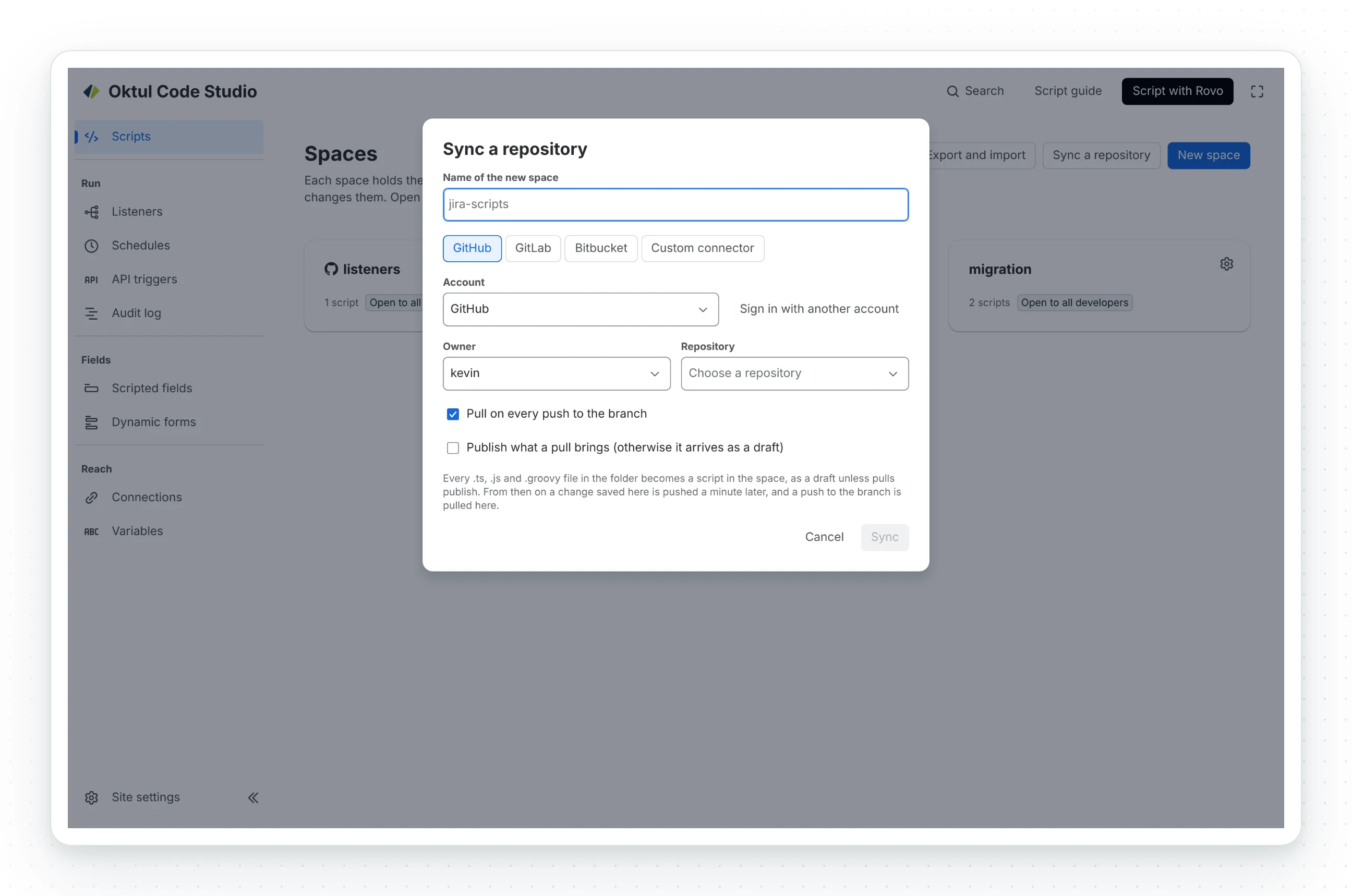
- Signing in. The console opens the provider’s token page with the token described, and you
paste the token back. GitHub takes a fine-grained personal access token. Bitbucket Cloud takes an
access token of the repository, project or workspace, which keeps working when the person who
made it leaves. GitLab, on gitlab.com or self-managed, takes a personal, group or project access
token with the
apiscope. Custom connector takes any HTTPS clone address and a token, with a user name if the host wants one, and speaks Git’s own protocol. The token is checked with the provider and kept in Forge’s secret store; the browser never gets it back. - Hosts other than the declared ones. A self-managed GitLab or another Git host is approved in Atlassian’s own dialog before the token is sent, so a host nobody approved never sees it. Code Studio creates no repository there and adds no webhook; add the push webhook by hand if you want pushes to start a pull.
- Pull. Files changed upstream become new drafts, and new files new scripts. A script changed on both sides keeps this side’s version and is reported as a conflict. A pull reads at most 80 files; a larger change takes several pulls. An administrator’s setting can publish what arrives.
- Push. Every changed draft and deletion in one commit. Refused while the branch has commits the space has not pulled.
- Sync. Every change saved in the app starts a pull, then a push, a minute later. A signed push webhook from the provider starts a pull.
Nothing runs from the provider. A provider outage, a revoked token or a force push cannot change what production runs.
Related
- Writing scripts
- Requests to other systems
- Script API reference
- Script examples
- Script snippets
- Sandbox and production
- Triggers
- Limits
A problem or a question? Write to support@oktul.com or open a request in the Help Center (opens in a new tab). Both open a request with a reference and an SLA.